Navigation menu
hello Guest

Instructor Manual
Add a Teaching Assistant
Just below the section description, there is an area where you can add the Teacher or Teaching Assistants to the new section. Click the Add New button, and provide your Teacher or Teaching Assistant’s email from the Role drop-down (if your Teacher or Teaching Assistant has signed-up on uCertify, his/her first and last name will be fetched automatically) and click the Save button. The Teaching Assistant has the ability to only view class information, roster, readiness score, focus, engagement report, activities, and test performance.
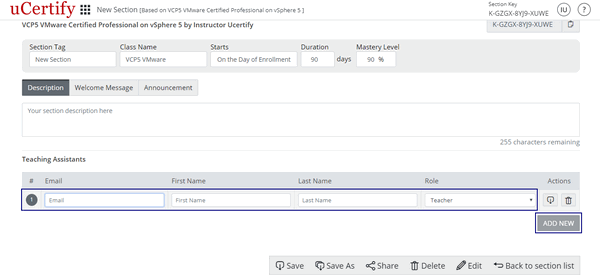
Figure 2.10: Add New Button with Teaching Assistant Details Boxes
Figure 2.10: Add New Button with Teaching Assistant Details Boxes