Navigation menu
hello Guest

Instructor Manual
Enroll Students
You can enroll students to use your course or section by clicking the Invite button and selecting the Enroll option.
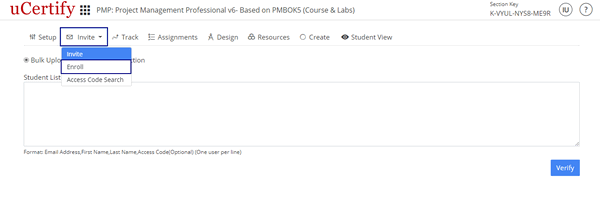
Figure 3.4: Invite Tab with Enroll Option
To enroll single student select the Enroll as a Student option, provide the required details, and click the Submit button.
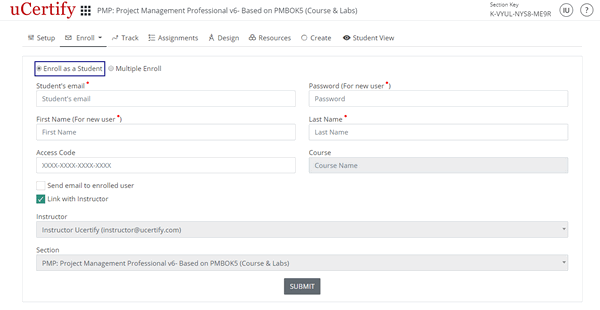
Figure 3.5: Enroll as a Student Page
To enroll multiple student select the Multiple Enroll option, provide the required details, and click the Next button.
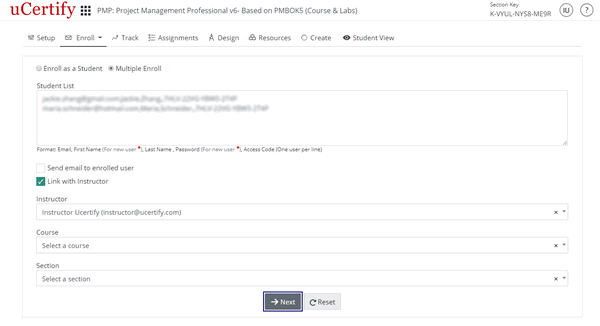
Figure 3.6: Multiple Enroll Page
Check the checkbox before the students Email and click the Enroll Selected button.
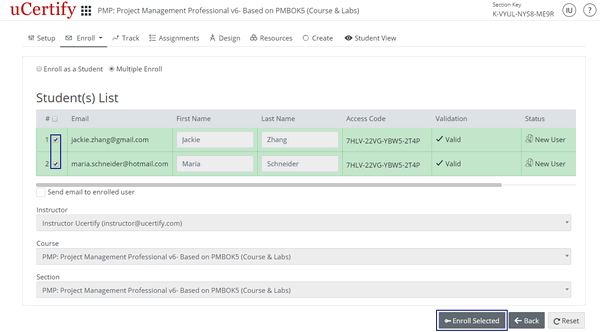
Figure 3.7: Student(s) List with Enroll Selected Option
Figure 3.4: Invite Tab with Enroll Option
To enroll single student select the Enroll as a Student option, provide the required details, and click the Submit button.
Figure 3.5: Enroll as a Student Page
To enroll multiple student select the Multiple Enroll option, provide the required details, and click the Next button.
Figure 3.6: Multiple Enroll Page
Check the checkbox before the students Email and click the Enroll Selected button.
Figure 3.7: Student(s) List with Enroll Selected Option